
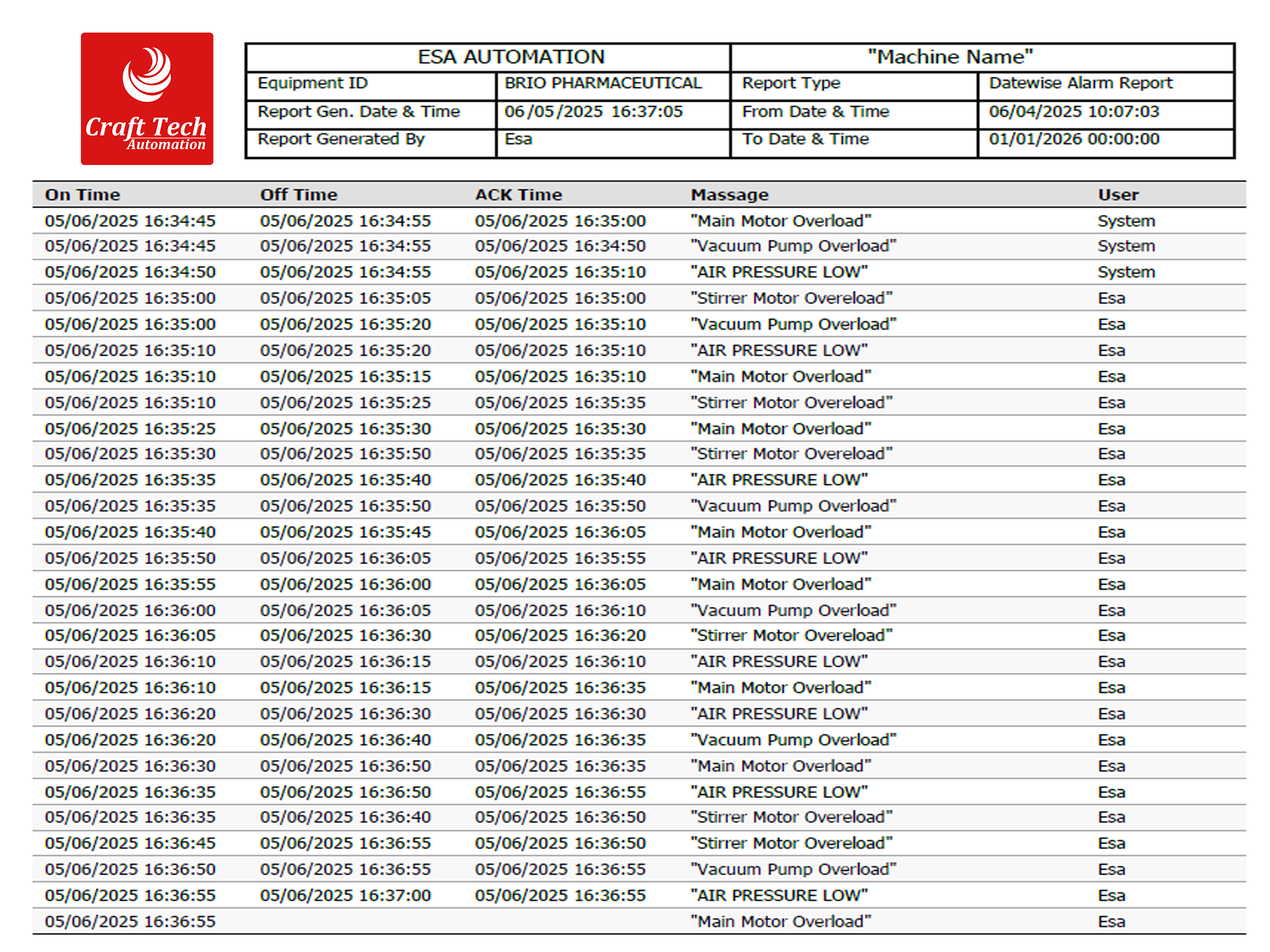

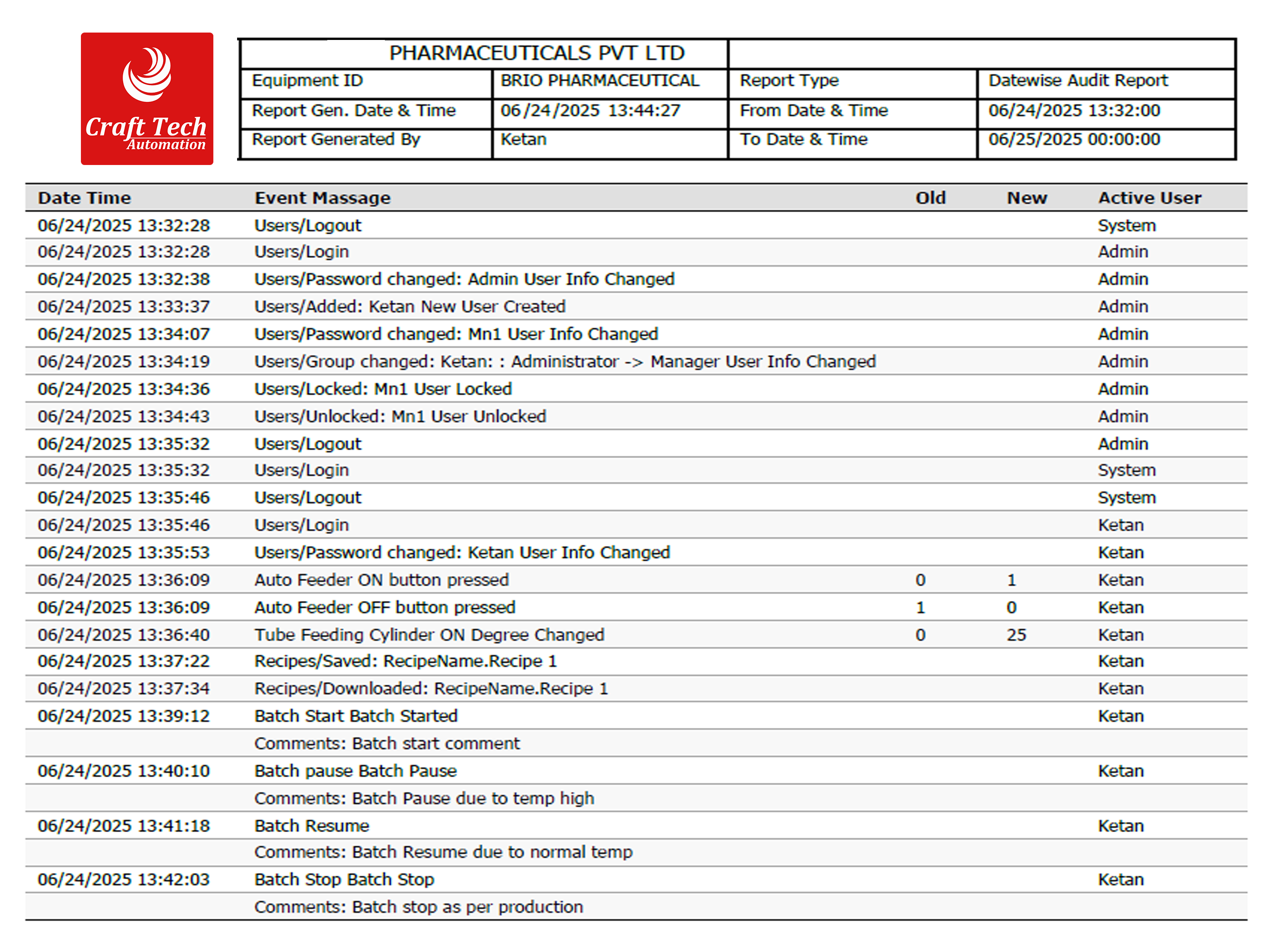
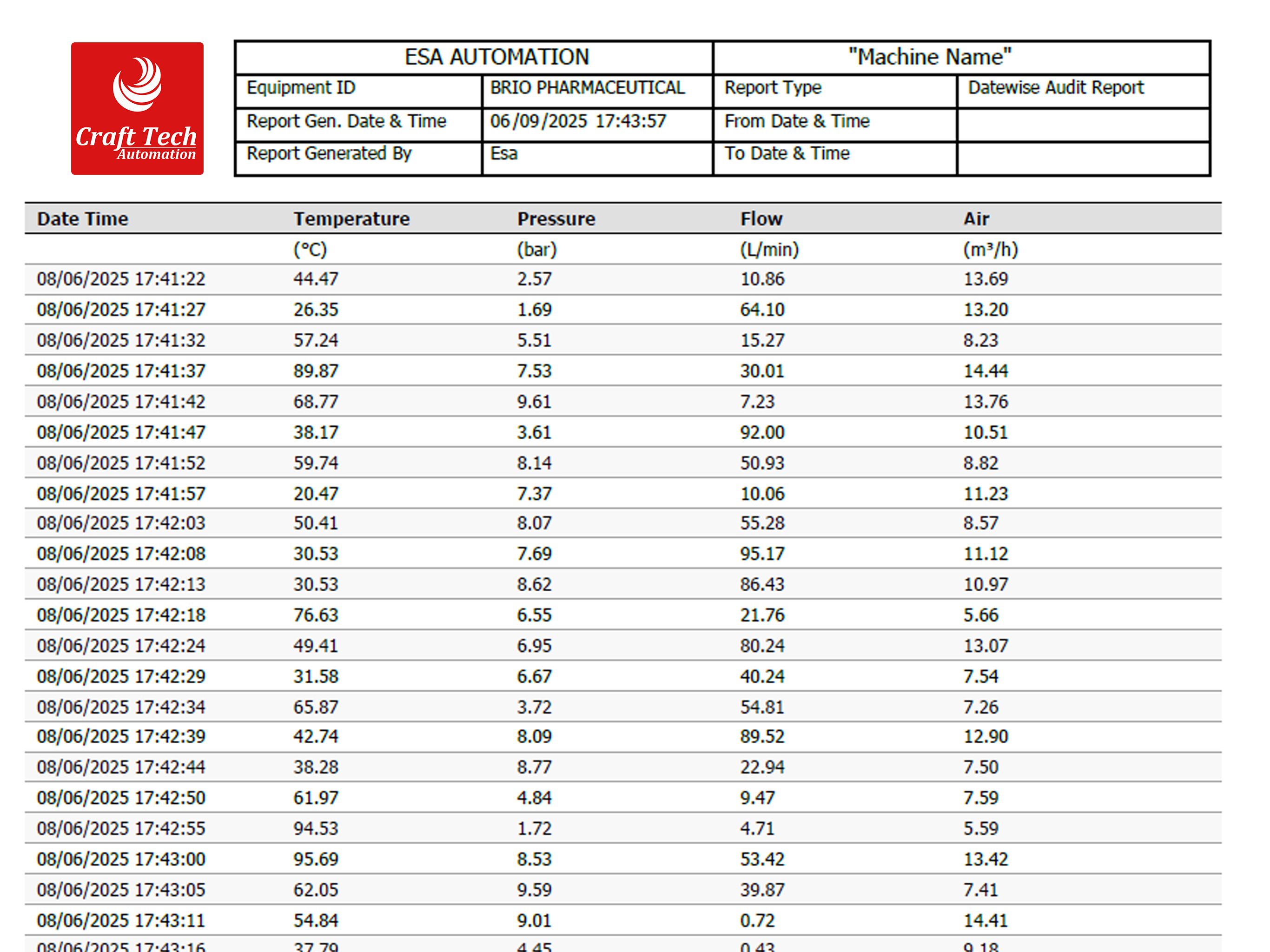
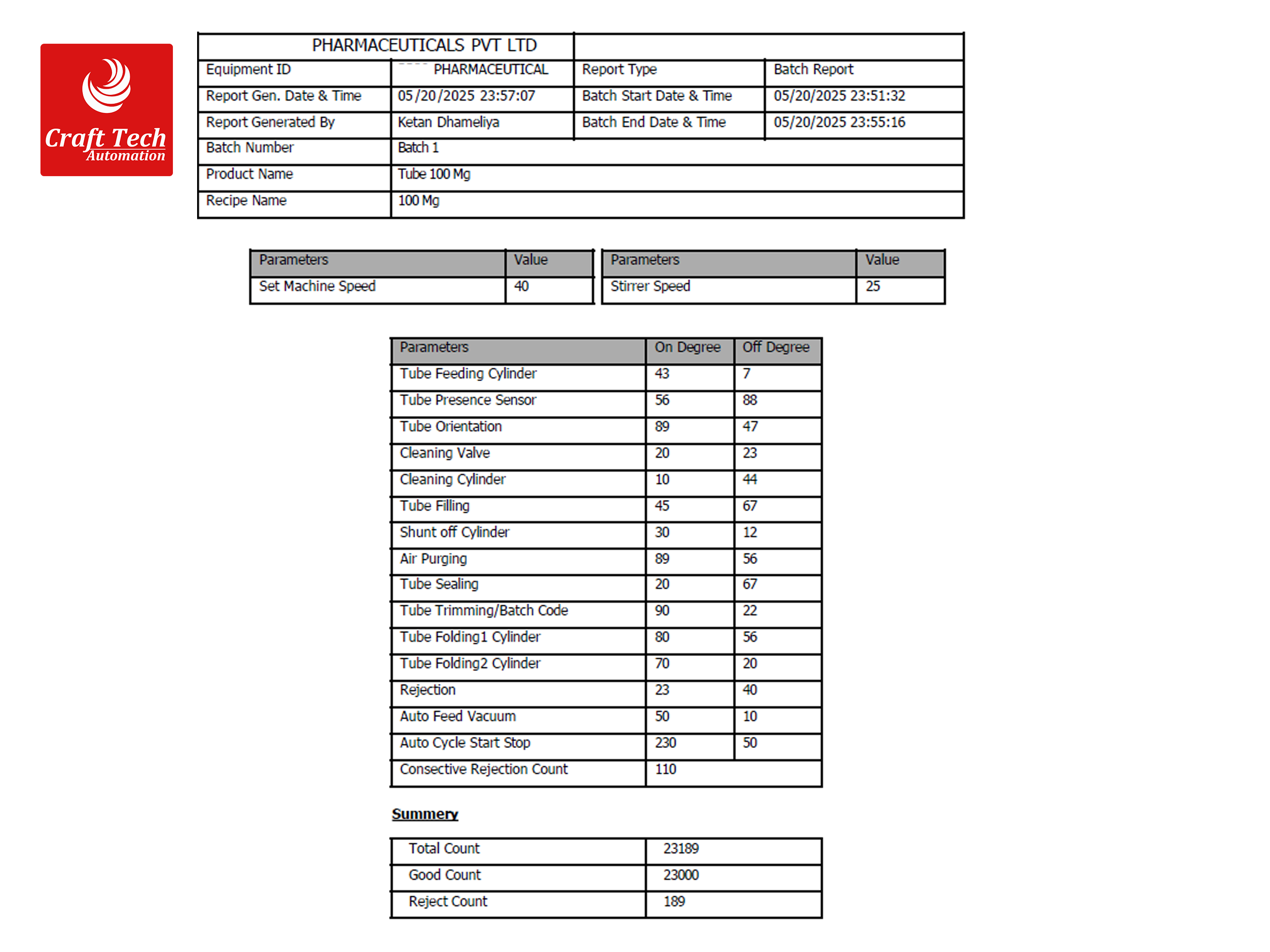

| Feature | Description |
|---|---|
| ▸REPORTING & PDF GENERATION | |
| Design | |
| No external tools required. | ESA HMI eliminates the need for third-party software to generate reports or PDFs. All functionalities are built-in, simplifying reporting and reducing dependencies. |
| Easy Report Formatting with Onsite Modifications | Support for real-time customization of layouts, data parameters, and formats directly onsite. |
| Report Format | |
| No USB/memory card required. | Reports are saved directly to the system for seamless and secure data handling. |
| Predefined functions are available in the editor. | Includes templates and tools to create professional reports quickly and efficiently. |
| PDF File Options | |
| Flexible File Generation | Reports can be combined into one file or generated separately for different scenarios. |
| Included Report Types |
Includes:
|
| Batch header |
|
| Filter Options | |
| Customizable Filters | Filter reports by batch, time, or user requirements to enhance relevance and accuracy. |
| Direct Print | |
| Wi-Fi/Ethernet Printing | Print directly over network without external software or devices. |
| PDF Viewer | |
| Inbuilt Viewer | Integrated viewer lets users read reports within the HMI system. |
| Electronic Signature | |
| Time-Stamped and User-Specific | Every signature is time-stamped and linked to a user for full traceability. |
| Prevention of Data Falsification | |
| Non-Editable Format | Reports are saved in a secure, read-only format to protect data authenticity. |
| ▸AUDIT TRAIL | |
| Data Entry Logs | |
| Comprehensive User Action Tracking |
Logs detailed user actions for traceability and accountability:
|
| Batch Log | |
| Batch Start-Stop Log | Tracks the start and stop times of each batch operation. |
| Batch Duplication | Logs all instances of batch duplication for traceability and auditing. |
| Viewer Customization | |
| Flexible Viewing and Reporting Options | Generate customized views and reports in PDF or print format to match user needs. |
| Retype Password for Critical Values | |
| Enhanced Security for Critical Operations | Requires password re-entry for sensitive operations, enhancing security. |
| Add Comments During Online Operations | |
| Real-Time Annotation Capability | Operators can add comments to buttons, events, or parameter values live during runtime. |
| Print/PDF by Filter | |
| Filtered Report Generation | Generate reports/logs in PDF or print format based on time or batch filters. |
| ▸USER MANAGEMENT | |
| Password Complexity | |
| Configurable Password Settings | Supports password lengths of 8-16 characters using alphanumeric and symbols for enhanced security. |
| Runtime Changes | Authorized users can modify passwords during system operation without interruptions. |
| RFID Login | |
| Seamless Integration | Enables secure and quick user login via RFID, eliminating manual entry. |
| User Levels | |
| Unlimited User Hierarchies | Supports an unrestricted number of user levels for precise access control. |
| Expiration and Warning Settings | |
| Customizable Notifications | Password expiration alerts can be configured during runtime or in the editor for better compliance. |
| Log Display | |
| Detailed Activity Tracking | Tracks user actions such as login/logout, password changes, and account updates. |
| Authorization Settings | |
| Dynamic Access Control | Allows real-time updates to read/write permissions. |
| User Limit | |
| No Restriction on User Accounts | Supports unlimited user accounts, scalable to any organization. |
| Force Password Change | |
| Mandatory Updates for New Accounts | Ensures users update passwords immediately after account creation. |
| Account Lock/Unlock | |
| Admin Control | Admins can unlock accounts as needed or permanently lock inactive ones. |
| Password Restrictions | |
| Prohibition of Previously Used Passwords | Users are restricted from reusing a set number of previous passwords. |
| Electronic Signatures Per User | |
| User-Specific E-Signatures | Each user can have a unique, configurable e-signature. |
| E-Sign Name | Allows a distinct signature name for each user for compliance and traceability. |
| ▸SYSTEM | |
| Backup & Restore | |
| Complete System Backup | Create full system backups including configuration and data for disaster recovery. |
| Restoration on Alternate HMI | Restore backup files seamlessly on another ESA HMI without compatibility issues. |
| Non-Editable Backup Files | Backups are encrypted and non-editable to maintain system integrity. |
| Database | |
| Proprietary Database | Uses a secure, non-editable proprietary ESA database ensuring reliability and compliance. |
| Third-Party Database Integration | Supports external databases (SQL, MS Access, Oracle) for infrastructure flexibility. |
| ▸ADDITIONAL FEATURES | |
| Multi-Language Support | |
| Global Usability | Supports multiple languages for international use. |
| Runtime Language Switching | Languages can be changed during runtime without restarting the system. |
| Remote Access | |
| Secure Remote Connectivity | Enables safe remote system access through secure connections. |
| Cross-Platform Monitoring and Control | Access the HMI system from desktop or mobile platforms for flexibility. |
| Video Viewer | |
| Embedded Video Playback | Supports live or recorded video playback directly on the HMI screen. |
| Use Cases | Ideal for process monitoring, operator training, and troubleshooting. |
| Browser Support | |
| Integrated Web Browser | Built-in browser enables access to online resources and applications. |
| Use Cases |
|
 +91 8866687234
 info@ct-automation.net
 407 B,Sahitya Business Park, Ring Road, near Sahajanand business park, opp. Man Palace Hotel, Nikol, Ahmedabad, Gujarat 382415


Copyright @ 2025 Craft Tech Automation PVT,LTD


 +91 8866687234
 info@ct-automation.net